
Overview
When an eBay listing has an error that prevents it from listing, it will appear in the Attention Required tab of the Listings Manager until the underlying issue is manually corrected.
This article walks through common error messages in the Listings>eBay>Attention Required tab, along with troubleshooting steps to clear each type of error.
Table of Contents
How to Bulk Review Attention Required Listings
How to See Detailed Error Messages
- 219021 Package weight is over the weight limit for service USPS First Class Package International. The maximum weight is x lbs.
- 22022 ShippableUnit item: Package girth, value Length plus girth(2x Width + 2x Height), exceeds the limit of 108.0 in. for service err:216146|108.0 in.
- 21916963 The dimensional weight of your package exceeds the weight limit for the shipping service you selected. Please check the dimensions of your package.
- 21916293 Lvis validation blocked.
- 21915479 Your charity listing status is suspended because you have unpaid donations. Please visit your Donation Account dashboard in My eBay on the website to resolve.
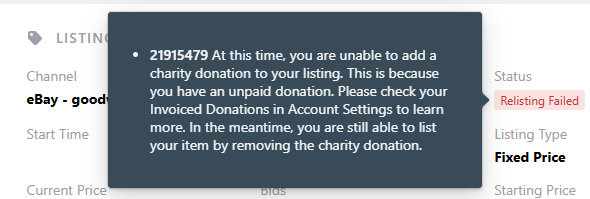
- 21915479 At this time, you are unable to add a charity donation to your listing. This is because you have an unpaid donation. Please check your Invoiced Donations in Account Settings to learn more. In the meantime, you are still able to list your item by removing the charity donation.
Best Practices
- Check your Attention Required tab on a daily basis and fix errors as soon as possible to list items to the marketplace
- If clearing older items from the attention required tab, double-check that the item is still in your inventory
How to Bulk Review Attention Required Listings
-
Navigate to the Attention Required tab of the Listings Manager
-
Select individual checkboxes next to items, or click the top checkbox to select all items on the page
-
Click the blue “Review” button at the bottom of the page
-
Review the error message at the top of the page and make any needed edits
-
Click the blue “Save and List” button at the top of the page
-
Click “Next” at the top of the page to move to the next listing
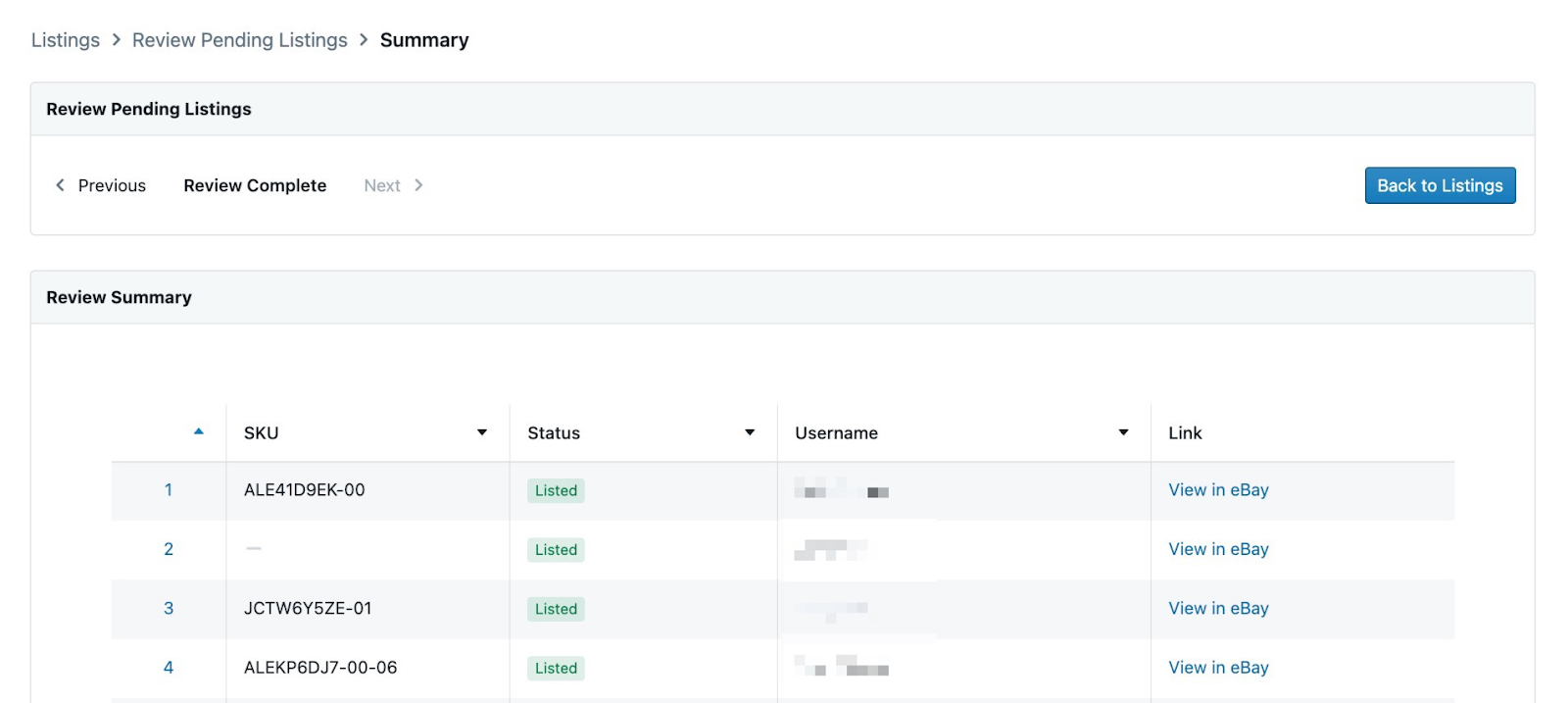
Once all edits have been saved, you’ll see a summary page of the current listing statuses for the listings:
How to See Detailed Error Messages
The Attention Required tab of the listing manager has a column that displays the full error message describing why a listing failed.

In addition, hovering the mouse cursor over the red “Listing Failed” or “Relisting Failed” icon will provide a tooltip with info about why the listing failed. This tooltip explains what needs to be modified in the listing for the item to post to eBay successfully.
Common Errors
240 The item cannot be listed or modified. The title and/or description may contain improper words, or the listing or seller may be in violation of eBay policy.
Why This Happens
This error can happen for a number of reasons, but most frequently can occur when:
- The title or description doesn’t accurately describe the condition or eBay category based on eBay's flagging algorithms
- The listing title contains keywords which may be category-specific that have been flagged by eBay and should not be included
- The product has been recalled by the manufacturer
- The item can't be sold via the eBay International Shipping Program
- eBay has placed a temporary restriction on listing for a policy violation (uncommon)
How to Fix
Clicking the edit button on the listing may show a more detailed response from eBay on what is wrong with the item, and what steps should be taken
- If the issue is related to flagged keywords, remove the keywords and Save
- Example: Primary electronics components such as audio receivers, computers, or TVs should not include the words "remote" or "keyboard" in the title
219021 Package weight is over the weight limit for service USPS First Class Package International. The maximum weight is x lbs.
Why This Happens
-
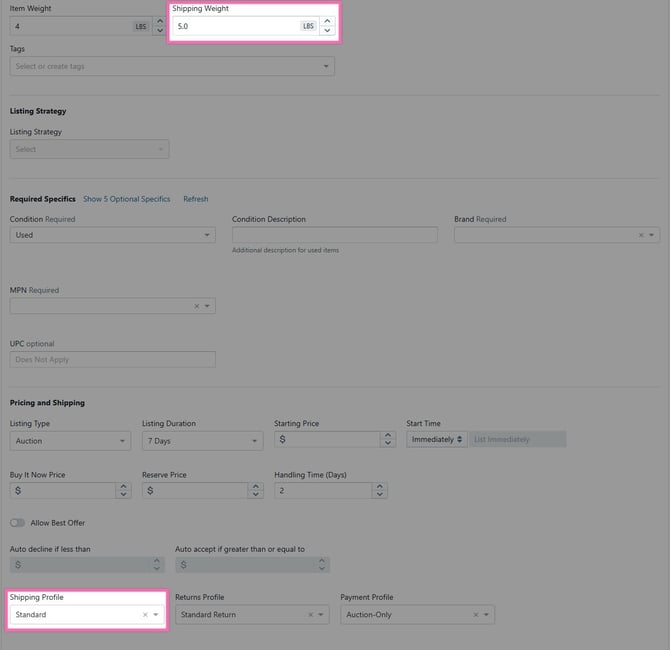
If the Shipping Weight in the listing is greater than the maximum allowable weight for the shipping service type selected in the associated eBay Shipping Policy, the listing will fail to list
How to Fix
Clicking the edit button on the listing will show a more detailed response from eBay on what is wrong with the item, and what steps should be taken.

-
Either edit the listing to reduce the Shipping Weight,
- Or change the Shipping Profile to one that is associated with a carrier service that allows heavier items, or to Local pickup only. See Managing eBay Business Policies for more details
22022 ShippableUnit item: Package girth, value Length plus girth(2x Width + 2x Height), exceeds the limit of 108.0 in. for service err:216146|108.0 in.
Why This Happens
-
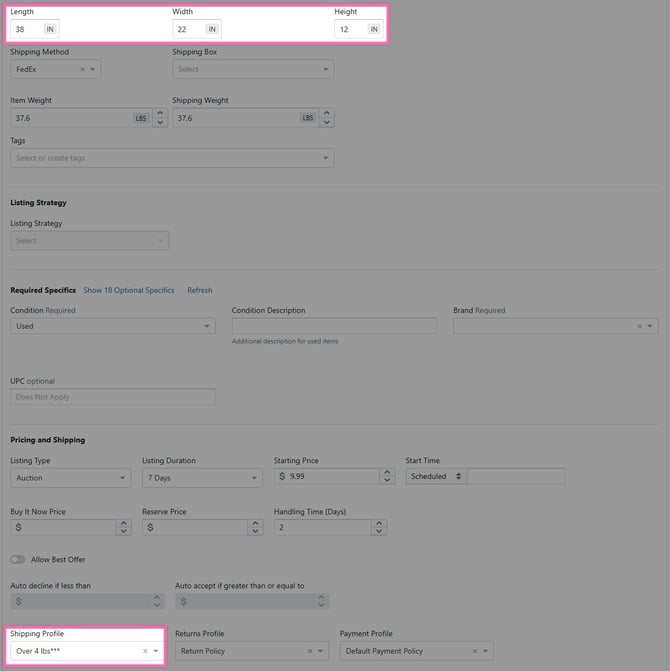
Shipping services have maximum allowable Length + Girth. Girth is calculated as (height + width) x 2 + length of the dimensions + box padding, or the Shipping Box size, whichever is larger
-
For example, for a listing with no Shipping Box selected, that has Length 38 in., Width 22 in., and Height 12 in., add 1 inch to each, then calculate the girth as 2 x (23+13) = 72 inches. Then add Length plus Girth, 39 + 72, so the total Length plus Girth for this item is 111 inches
-
-
If the Length + Girth in the listing is greater than the maximum allowable Length + Girth for the shipping service type selected in the associated eBay Shipping Policy, the listing will fail to list
- USPS Ground Advantage has a maximum Length + Girth limit of 130 inches
-
- USPS Priority Mail and USPS Priority Mail Express have a maximum Length + Girth limit of 108 inches
- FedEx Ground and FedEx Home Delivery have a maximum Length + Girth limit of 165 inches
- FedEx Ground Economy (formerly called FedEx SmartPost) has a maximum Length + Girth limit of 130 inches
-
- FedEx Express U.S. has a maximum Length + Girth limit of 165 inches
- FedEx Express international has a maximum Length + Girth limit of 108 inches
- UPS Ground has a maximum Length + Girth limit of 165 inches
- UPS Ground Saver (formerly called UPS SurePost) has a maximum Length + Girth limit of 130 inches
How to Fix
Clicking the edit button on the listing will show a more detailed response from eBay on what is wrong with the item, and what steps should be taken.

-
Either edit the listing to reduce the Length + Girth,
- Or change the Shipping Profile to one that is associated with a carrier service that allows larger Length + Girth, or to Local pickup only. See Managing eBay Business Policies for more details
21916963 The dimensional weight of your package exceeds the weight limit for the shipping service you selected. Please check the dimensions of your package.
Why This Happens
- Some shipping services use DIM weight instead of Weight when the dimensions exceed the carrier service type's outside maximum limit
-
USPS Priority Mail has a maximum weight limit of 70 pounds, regardless of the dimensional (DIM) weight or package size. For packages exceeding 1 cubic foot (1,728 cubic inches), dimensional weight is calculated by multiplying length x width x height and dividing by 166, which is then compared to the actual weight; the higher value is used to determine the price
- UPS has a maximum weight limit of 150 pounds. Packages with a high DIM weight face significant over maximum limit fees
-
How to Fix
-
Either edit the listing to reduce the Weight or dimensions,
- Or change the Shipping Profile to one that is associated with a carrier service that allows larger Weight or dimensions, or to Local pickup only. See Managing eBay Business Policies for more details
21919137 Buyers love large photos that clearly show the item, so please upload high-resolution photos that are at least 500 pixels on the longest side.
Why This Happens
- If a picture in the listing does not have a length or width of at least 500 pixels, the listing may fail to list
- This can happen when relisting an item that originally had a picture that didn’t meet the 500-pixel minimum, as eBay is more strict on relisted items to help boost the possibility of a sale
How to Fix
-
Edit the listing and use the photo editor to review the length and height of each picture
-
Remove/re-take any pictures where the size is less than 500 pixels on the longest side
💡Operational Tip: Ensure all pictures have at least one side with 500 or more pixels when editing them during your photography step.
21919303 The item specific XXX is missing.
Why This Happens
Occasionally, eBay updates the required specifics of a specific category. If an item was listed before these specifics were required, the item may fail to relist until the missing item specifics are added.
How to Fix
-
Edit the listing and add any item specifics that are missing
-
Save the listing and relist the item
Edit the listing and add any item specifics that are missing
Save the listing and relist the item
21916293 Lvis validation blocked.
Why This Happens
Lvis (Licensing Verification and Information System) blocks listings that do not meet eBay's standards for content or policy compliance. This error can relate to several different issues, and may occur in conjunction with another error that includes more details. The most common reasons include:
- There may be a copyright violation
- The title or description may contains forbidden words or phrases flagged by eBay policy
- The account may be temporarily blocked or may have listing limits, non-performance issues, or copyright restriction
How to Fix

- Review the content to remove any suspicious keywords, forbidden brand names, or misleading, prohibited, or copyrighted content from the title and description
- Try revising the listing making changes to title or description, and ensuring that the item meets the requirements for the selected category
- Verify if your account is under restrictions or has reached selling limits. If this is the reason, we recommend reaching out to eBay regarding your account status
Uncommon Errors
Error: Current eBay listing is not a valid concurrent listing.
Why This Happens
A concurrent listing must be a Buy Now listing without an auction component. If the starting bid is lower than the buy now price, the listing will fail until corrected.
How to Fix
-
Edit the listing so the Listing Type is “Fixed Price”
-
Save the listing
21917141 To require immediate payment, you must specify a Buy It Now price.
Why This Happens
Auction-style listings must be connected to an eBay business payment policy that does not require immediate payment.

How to Fix
Change the payment policy in the listing to one that does not require immediate payment.

Error: Images failed to upload. Please remove any broken images and retry.
Why This Happens
This can happen for a number of reasons. Sometimes due to:
- Large image size
- Slow network connection speeds
- Dropped internet connection
- Modifying an actively listed product/listing
Instead of the image upload icon spinning forever, you'll instead see the error that the Image failed to upload and could not be found.
If you start seeing these errors more often, please reach out to Upright support with an example product SKU and we can try to provide further insight into why the image failed to upload. It could be something as simple as a recent change in a camera setting or network speeds that's causing this to happen.
How to Fix
Unfortunately, at this point, there's no way for us to recover the lost image. You'll need to click the x to delete the corrupted image and re-upload a new copy.
Relisting or Listing Failed: No error message
Why This Happens
This can happen for a number of reasons, but typically occurs if your internet connection is unstable while the item is being listed.
How to Fix
-
Check that the item is still available in inventory to sell
-
If available, click "relist" on the item to publish the listing
-
If no longer available, click “Delete” on the item to remove the listing
Recycling Failed: No Error Message
Why This Happens
Very rarely, a listing strategy may not recycle the listing on the first attempt.
How to Fix
-
Click "Recycle" on the listing page to remove the listing
-
If manually recycling fails to fix the error, please reach out to us via live chat or email (support@uprightlabs.com) with the item SKU so we can help recycle the item
17 This item cannot be accessed because the listing has been deleted or you are not the seller.
Why This Happens
This can happen if the original listing was deleted by eBay (For instance, if the original listing is over 90 days old, or the original item was flagged as possibly counterfeit)
How to Fix
If the item is available to sell, you’ll need help from our team to relist the item. Please reach out to us via live chat, or email us at support@uprightlabs.com and include the product SKU in your message so we can repair the listing.
10007 Sorry, something went wrong. Please wait a moment and try again.
Why This Happens
This can happen if there’s a momentary error on eBay’s servers when listing an item.
How to Fix
- Click "Relist" or “List” on the listing page to publish the listing to eBay
- If manually listing fails, please reach out to us via live chat or email (support@uprightlabs.com) with the item SKU so we can help list the item
21916250 A return option is missing or not valid. Update your return options.
Why This Happens
This issue usually happens when a listing is using a return profile that no longer exists on eBay (or is no longer valid on eBay). We see this happen when a change is made to the Seller Profiles on eBay, but not synced back to Lister.
How to Fix
- First, ensure your eBay Business Policies are synced to Lister and connected to the appropriate listing strategies
- Next, Edit the failed listing and select an appropriate return policy
21915479 Your charity listing status is suspended because you have unpaid donations. Please visit your Donation Account dashboard in My eBay on the website to resolve.
Why This Happens
This error comes straight from eBay, and is caused by a violation of their charity seller program. Failure to pay an overdue donation is often cited as a reason for suspension.

How to Fix
This is an issue that will require you to reach out to eBay regarding your account and your charity suspension.
Here is an article about the charity program's terms and conditions.
Additionally, we recommend looking at your donation account dashboard on eBay, as well as your eBay inbox, for any more information from eBay about your suspension. Once the suspension is lifted by eBay, you will be able to list items as usual.
21915479 At this time, you are unable to add a charity donation to your listing. This is because you have an unpaid donation. Please check your Invoiced Donations in Account Settings to learn more. In the meantime, you are still able to list your item by removing the charity donation.
Why This Happens
This error comes directly from eBay and happens when you have an unpaid donation associated with your eBay for Charity account. If a donation hasn't been successfully processed, for example, due to a failed payment, it becomes what is considered an unpaid donation.
How to Fix
- Go to your Account Settings on eBay and find the section related to eBay for Charity or Invoiced Donations. You should be able to see the details of the unpaid donation(s) there
- Follow the instructions provided by eBay, which typically involves paying the donation through PayPal or another payment method. Be sure your payment information is up-to-date
If you are still unable to list/relist failed listings after resolving the above steps, you may be required to reach out to eBay regarding your account to remove the block. Once the block is lifted by eBay, you will be able to list items as usual.
Have questions or need extra help? We’ve got you covered. Find all our support options at uprightlabs.com/support.